Tuesday, 28 September 2021

Design Browser History - LeetCode 1472

 You have a browser of one tab where you start on the homepage and you can visit another url, get back in the history number of steps or move forward in the history number of steps.

Implement the BrowserHistory class:

  • BrowserHistory(string homepage) Initializes the object with the homepage of the browser.
  • void visit(string url) Visits url from the current page. It clears up all the forward history.
  • string back(int steps) Move steps back in history. If you can only return x steps in the history and steps > x, you will return only x steps. Return the current url after moving back in history at most steps.
  • string forward(int steps) Move steps forward in history. If you can only forward x steps in the history and steps > x, you will forward only x steps. Return the current url after forwarding in history at most steps.


Example:

Input:
["BrowserHistory","visit","visit","visit","back","back","forward","visit","forward","back","back"]
[["leetcode.com"],["google.com"],["facebook.com"],["youtube.com"],[1],[1],[1],["linkedin.com"],[2],[2],[7]]
Output:
[null,null,null,null,"facebook.com","google.com","facebook.com",null,"linkedin.com","google.com","leetcode.com"]

Explanation:
BrowserHistory browserHistory = new BrowserHistory("leetcode.com");
browserHistory.visit("google.com");       // You are in "leetcode.com". Visit "google.com"
browserHistory.visit("facebook.com");     // You are in "google.com". Visit "facebook.com"
browserHistory.visit("youtube.com");      // You are in "facebook.com". Visit "youtube.com"
browserHistory.back(1);                   // You are in "youtube.com", move back to "facebook.com" return "facebook.com"
browserHistory.back(1);                   // You are in "facebook.com", move back to "google.com" return "google.com"
browserHistory.forward(1);                // You are in "google.com", move forward to "facebook.com" return "facebook.com"
browserHistory.visit("linkedin.com");     // You are in "facebook.com". Visit "linkedin.com"
browserHistory.forward(2);                // You are in "linkedin.com", you cannot move forward any steps.
browserHistory.back(2);                   // You are in "linkedin.com", move back two steps to "facebook.com" then to "google.com". return "google.com"
browserHistory.back(7);                   // You are in "google.com", you can move back only one step to "leetcode.com". return "leetcode.com"


Solution(Only function):

class BrowserHistory {


    class ListNode{

        String url;

        ListNode next,prev;


        ListNode(String url)

        {

             this.url=url;

            next=null;

            prev=null;

        }

    }

    ListNode curr,tempNode;

    public BrowserHistory(String homepage) {

        curr=new ListNode(homepage);     

    }


    public void visit(String url) {

        tempNode=new ListNode(url);

        curr.next=tempNode;

        tempNode.prev=curr;

        curr=curr.next;

    }


    public String back(int steps) {


        while(curr.prev!=null && steps-- > 0){

            curr=curr.prev;

        }

        return curr.url;

    }


    public String forward(int steps) {

         while(curr.next!=null && steps-- > 0){

            curr=curr.next;

        }

        return curr.url;

    }

}


/**

 * Your BrowserHistory object will be instantiated and called as such:

 * BrowserHistory obj = new BrowserHistory(homepage);

 * obj.visit(url);

 * String param_2 = obj.back(steps);

 * String param_3 = obj.forward(steps);

 */

Monday, 27 September 2021

Merge In Between Linked Lists - LeetCode 1669

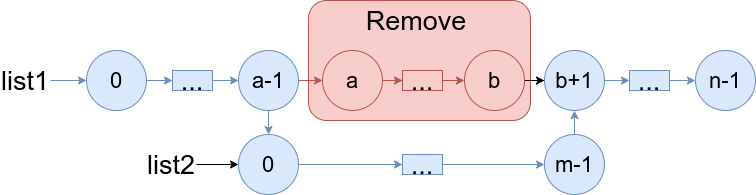
 You are given two linked lists: list1 and list2 of sizes n and m respectively.

Remove list1's nodes from the ath node to the bth node, and put list2 in their place.

The blue edges and nodes in the following figure incidate the result:

Build the result list and return its head.


Example 1:

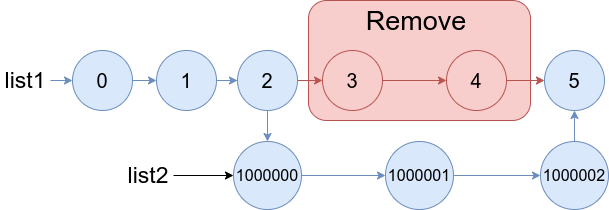
Input: list1 = [0,1,2,3,4,5], a = 3, b = 4, list2 = [1000000,1000001,1000002]
Output: [0,1,2,1000000,1000001,1000002,5]
Explanation: We remove the nodes 3 and 4 and put the entire list2 in their place. The blue edges and nodes in the above figure indicate the result.

Example 2:

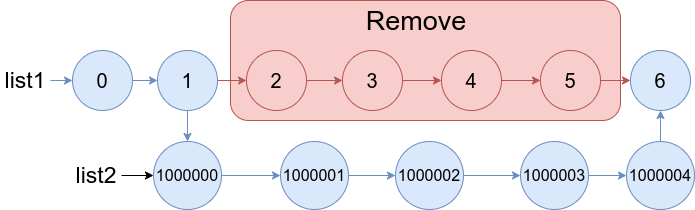
Input: list1 = [0,1,2,3,4,5,6], a = 2, b = 5, list2 = [1000000,1000001,1000002,1000003,1000004]
Output: [0,1,1000000,1000001,1000002,1000003,1000004,6]
Explanation: The blue edges and nodes in the above figure indicate the result.


Solutions(Only function):

class Solution {

    public ListNode mergeInBetween(ListNode l1, int a, int b, ListNode l2) {


        ListNode curr=l1;

        ListNode d0=null,e0=null;

        int flag=0,count=1;  

        while(curr!=null)

        {

            if(count==a)

                d0=curr;

            if(count==b)

                e0=curr.next.next;


            curr=curr.next;

            ++count;

        }

        d0.next=l2;

        curr=l2;


        while(curr.next!=null)

        {

            curr=curr.next;

        }

        curr.next=e0;


        return l1;

    }


}

Palindrome Linked List - LeetCode 234

 Given the head of a singly linked list, return true if it is a palindrome.


Example 1:

Input: head = [1,2,2,1]
Output: true

Example 2:

Input: head = [1,2]
Output: false


Solution(Only function):

class Solution {

    public boolean isPalindrome(ListNode head) {


        ListNode tortoise=head;

        ListNode hare=head;


        while(hare!=null && hare.next!=null)

        {

            tortoise=tortoise.next;

            hare=hare.next.next;

        }


       tortoise=reversed(tortoise);

        hare=head;


        while(tortoise!=null)

        {

            if(tortoise.val!=hare.val)

                return false;


            tortoise=tortoise.next;

            hare=hare.next;


        }

     return true;

    }

    public ListNode reversed(ListNode head)

    {

        ListNode previous=null;

         while(head!=null)

        {

            ListNode next=head.next;

            head.next=previous;

            previous=head;

            head=next;


        }

        return previous;

    }

}

Sunday, 26 September 2021

Convert Binary Number in a Linked List to Integer - LeetCode 1290

 Given head which is a reference node to a singly-linked list. The value of each node in the linked list is either 0 or 1. The linked list holds the binary representation of a number.

Return the decimal value of the number in the linked list.


Example 1:

Input: head = [1,0,1]
Output: 5
Explanation: (101) in base 2 = (5) in base 10

Example 2:

Input: head = [0]
Output: 0

Example 3:

Input: head = [1]
Output: 1

Example 4:

Input: head = [1,0,0,1,0,0,1,1,1,0,0,0,0,0,0]
Output: 18880

Example 5:

Input: head = [0,0]
Output: 0


Solutions(Only function):

class Solution {

    public int getDecimalValue(ListNode head) {    

        int num=0;

        while(head!=null)

        {

            num=num*2+head.val;

            head=head.next;

        }

        return num;

    }

}

Delete Node in a Linked list - LeetCode 237

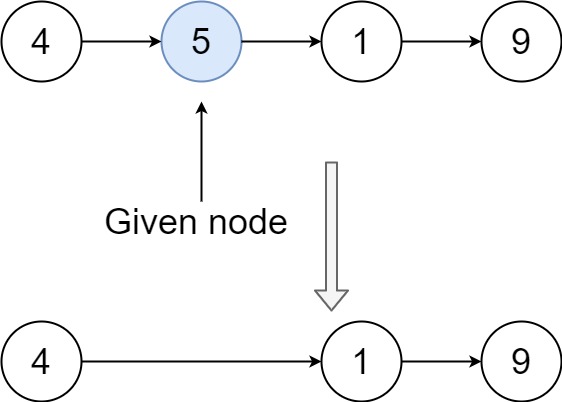
 Write a function to delete a node in a singly-linked list. You will not be given access to the head of the list, instead you will be given access to the node to be deleted directly.

It is guaranteed that the node to be deleted is not a tail node in the list.


Example 1:

Input: head = [4,5,1,9], node = 5
Output: [4,1,9]
Explanation: You are given the second node with value 5, the linked list should become 4 -> 1 -> 9 after calling your function.

Example 2:

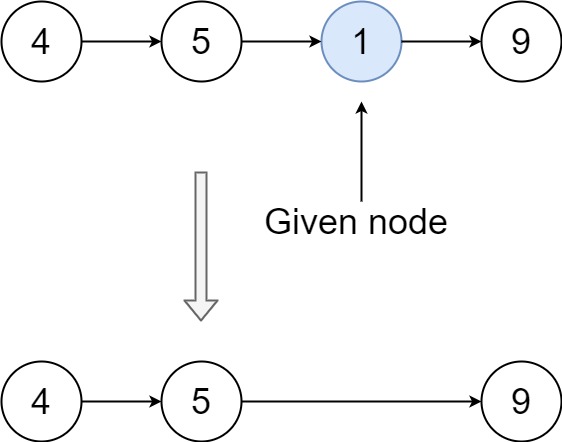
Input: head = [4,5,1,9], node = 1
Output: [4,5,9]
Explanation: You are given the third node with value 1, the linked list should become 4 -> 5 -> 9 after calling your function.

Example 3:

Input: head = [1,2,3,4], node = 3
Output: [1,2,4]

Example 4:

Input: head = [0,1], node = 0
Output: [1]

Example 5:

Input: head = [-3,5,-99], node = -3
Output: [5,-99]


Solution(Only function):

class Solution {

    public void deleteNode(ListNode node) {

      node.val=node.next.val;

        node.next=node.next.next;

    }

}

Random password generator in Java

       Random password generator in Java Source code: mport java.io.*; import java.util.*; public class Main { public static void main(Str...